How to Fill the NEET PG 2026 Registration Form Without Mistakes
- Jul 1
- 7 min read
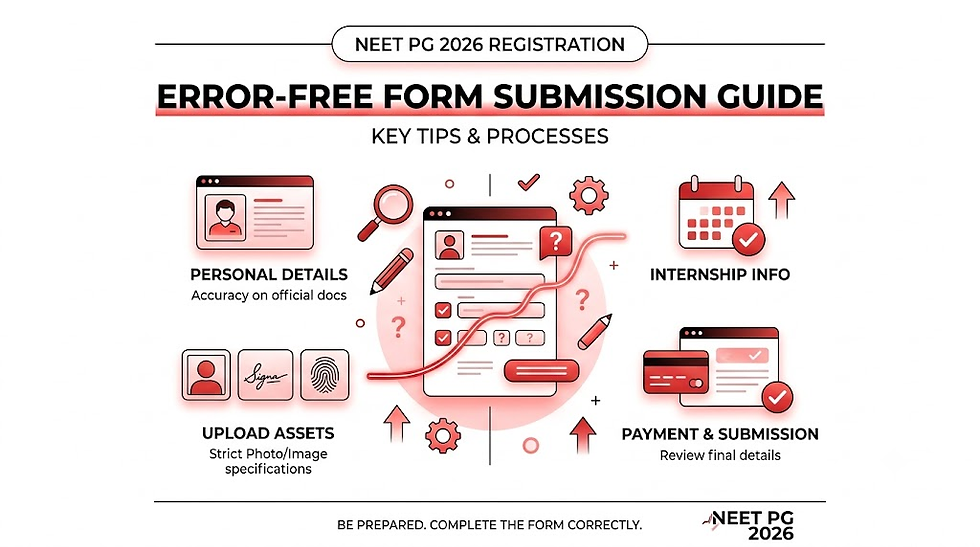
Navigating the National Eligibility cum Entrance Test for Postgraduates (NEET PG) application can feel just as high-stakes as the exam itself. A single typographical error or a non-compliant document upload can lead to the outright rejection of your application, putting years of hard work on hold.
The National Board of Examinations in Medical Sciences (NBEMS) officially opened the application window on July 1, 2026, with the registration portal remaining active until July 21, 2026 (11:55 PM). With the highly anticipated computer-based exam scheduled for August 30, 2026, managing your application with absolute precision is your immediate priority.
This ultimate guide breaks down exactly how to fill the NEET PG 2026 registration form without mistakes, highlighting critical 2026 policy changes, step-by-step submission workflows, and image optimization standards.
NEET PG 2026 Registration: Key Dates and Deadlines
Before diving into the technical steps, bookmark the official timeline released by NBEMS for this academic session. Missing a deadline or assuming an edit window will bail you out of a critical error is a risky approach.
Event Milestones | Crucial Dates (Official 2026 Schedule) |
Release of Official Information Bulletin | July 1, 2026 (4:00 PM) |
Online Registration Commencement | July 1, 2026 (5:00 PM) |
Closing Date for Application Submission | July 21, 2026 (Up to 11:55 PM) |
Allotted Test City Intimation Slip | August 11, 2026 |
Admit Card Release Date | August 27, 2026 |
NEET PG 2026 Exam Date | August 30, 2026 |
Declaration of Results | By September 30, 2026 |
Crucial 2026 Policy Changes: The New Exam Centre Allocation System
The biggest update introduced by NBEMS this year completely alters how exam cities are distributed. The traditional "first-come, first-served" rule for test center allocation has been completely permanently discarded.
Submitting your form at 5:01 PM on day one does not give you a competitive advantage or secure your local center over someone applying on the final day. Instead, a structural state-preference alignment system has been introduced:
Three State Preferences Required: Every applicant must select exactly three preferred test states.
The Correspondence State Rule: Your First Preferred Test State must match the exact State of Correspondence Address you provide in your personal details section.
Neighboring States Constraint: Your second and third preferred test states must be geographically neighboring states to your primary correspondence state.
Zero Corrections Allowed: NBEMS has explicitly clarified that your correspondence address and chosen test state preferences are locked upon final payment. They cannot be edited during the correction window.
Critical Warning: If you attempt to use a temporary address to game the system for a specific test city, you must provide valid, legally acceptable address proof for that correspondence location. Failing to match your address proof with your first preferred state will put your application at risk of structural rejection.
Step-by-Step Guide: How to Fill the NEET PG 2026 Registration Form Without Mistakes
To ensure an error-free submission, process your application systematically. This guide breaks down the full workflow into structured stages.
Phase 1: Pre-Registration Checklist
Gather your legal credentials and professional proof before clicking the registration link. You will need:
Your complete legal name exactly as it appears on your MBBS Degree/Provisional Certificate.
A valid, active mobile number and a personal email address (do not use internet cafe or third-party credentials).
Your National Medical Commission (NMC) or State Medical Council (SMC) registration number.
A valid Government-issued photo ID (Aadhaar Card, Passport, PAN Card, Voter ID, or Driving License) along with its unique identification number.
Your MBBS mark sheets, passing certificates, and your precise Compulsory Rotatory Residential Internship (CRRI) start and completion dates.
Phase 2: Form Execution Protocol
Follow these exact operational steps to submit your application securely:
Create New User Profile and Login Credentials:Estimated time: 5-10 minutes.
Navigate to the official NBEMS portals at nbe.edu.in or natboard.edu.in. Click on the 'NEET-PG 2026' tab and select 'New Registration'. Carefully input your Name, Date of Birth, Gender, Nationality, Email ID, and Mobile Number. Double-check for typos before clicking submit, as these basic fields serve as your permanent identity profile. Your system-generated User ID and Password will be sent immediately via SMS and Email.
Input Comprehensive Personal and Contact Profiles:Critical validation stage.
Log back into the portal using your new credentials. Fill in your Father's name, Mother's name, and two distinct physical identification marks (such as a distinct birthmark or a facial scar). Provide your permanent address and your current correspondence address. Remember, your correspondence address dictates your primary test state allotment options.
Enter Academic Profiles and Council Registrations:MBBS and Internship data integration.
Input your MBBS university details, state of passing, aggregate marks, and graduation year. Enter your permanent or provisional NMC/SMC registration number. You must also supply your precise internship details. Ensure your internship completion date satisfies the official cutoff requirements specified in the 2026 information bulletin.
Execute State and City Preferences Alignment:Adhering to the new 2026 guidelines.
Select your three test state choices based on your current physical residency. Ensure your first choice perfectly aligns with your correspondence state address, selecting adjacent states for your secondary and tertiary options.
Upload Standardized Visual and Document Assets:Adhering to rigid NBE digital specifications.
Upload your digital passport-size photograph, scanned signature, and clear left-hand thumb impression. If applicable, upload your valid category certificates (OBC-NCL, EWS, SC, ST, or PwD) exactly in the PDF formats requested.
Fee Processing and Final Confirmation Summary:Irreversible financial execution.
Review the final comprehensive summary page line by line. Once satisfied, proceed to the secure online payment gateway. The revised application fee structure stands at ₹3,500 for General, OBC, and EWS candidates, and ₹2,500 for SC, ST, and PwD candidates. Complete the transaction via Credit Card, Debit Card, Net Banking, or UPI. Download and print the payment confirmation page and the final submitted application form for future verification.
Formatting Digital Assets: Avoiding Image Rejection
Unclear, heavily edited, or non-compliant image uploads are among the leading causes of non-issuance of admit cards. NBEMS utilizes automated biometric verification systems; hence, your uploaded photos must match strict technical criteria.
1. Passport-Size Photograph Requirements
Recency: Must be captured within the last three months from your application date.
Background: Solid, clean white background only. Shadowed, textured, or outdoor backgrounds will be flagged.
Composition: Full face, front view, looking directly into the camera lens with a neutral expression. Both eyes and ears must be clearly visible. Avoid caps, hoodies, or tinted glasses.
Technical Dimension Bounds: 35mm x 45mm, saved in JPG/JPEG format, with a file size strictly between 20 KB and 100 KB.
2. Scanned Signature Guidelines
Execution: Draw your signature inside a clear box on bright white paper using a black or dark blue ink pen. Do not write your name in block capital letters; it must be your functional cursive signature.
Technical Dimension Bounds: Saved in JPG/JPEG format, with a file size strictly between 10 KB and 50 KB. Ensure the crop window excludes excess white space.
Top 5 Mistakes to Avoid in the NEET PG Application Form
To protect your candidacy, pay close attention to these common problem areas during data entry:
Name Mismatches Against Official ID: Do not use casual names, initials, or titles (like Dr.) if they aren't on your MBBS degree. Your name must perfectly match your medical council registration papers and government-issued ID.
Mismatched Correspondence Address and Test States: If you register your correspondence address in Maharashtra but select Karnataka as your first preferred test state, the system will flag your application for non-compliance.
Typos in the NMC/SMC Registration Number: A single inverted digit in your medical council number can create significant complications during counseling and physical document verification.
Using an Inactive Mobile Number or Email: All critical updates, including your exam city slip alerts, password recoveries, and counselling schedules, are routed through your registered contact details. Do not use temporary or shared contact info.
Assuming the Edit Window Can Fix Everything: While NBEMS provides a brief correction window post-registration, critical identity fields, correspondence addresses, and test state preferences cannot be changed under any circumstances. Get it right the first time.
Frequently Asked Questions (FAQs)
Q1: What is the most critical factor to remember on how to fill the NEET PG 2026 registration form without mistakes?
The most critical factor is ensuring your correspondence address matches your first preferred test state, and verifying that all personal identity data matches your MBBS certificate exactly. Because these core fields are locked upon final payment, double-checking your summary before completing the transaction is the most effective way to fill the form without errors.
Q2: Can I change my chosen exam state or city preference during the NBEMS correction window?
No. Under the updated 2026 guidelines, your correspondence address and your three test state preferences are locked immediately upon submission. They cannot be modified or edited during the pre-exam correction window.
Q3: What should I do if my online fee payment fails but the money is deducted from my bank account?
If your transaction fails on the portal but funds are deducted, do not attempt immediate multiple repayments. Wait for 24 to 48 hours for the payment gateway status to sync with the NBEMS portal. If it still shows pending, the deducted amount is typically credited back to your source account automatically within 7 working days, and you will need to initiate a fresh payment before the July 21 deadline.
Q4: Are exam cities allotted on a first-come, first-served basis for NEET PG 2026?
No. NBEMS has explicitly discarded the first-come, first-served model for the 2026 session. All applications submitted within the registration window (July 1 to July 21) will be treated equally for center allocation based on administrative, logistical, and state-preference metrics.
Official Links and Resources
For safe and secure processing, always use the direct, verified portals managed by the examination board. Avoid using third-party redirect links or unverified portals.
Official Registration Portal: NBEMS Application Portal (nbe.edu.in)
Official Institutional Website: National Board of Examinations in Medical Sciences (natboard.edu.in)
Queries and Candidate Support: For direct technical queries, log into your applicant profile and submit an official ticket via the Communication Web Portal accessible on the main homepage.


Comments