Master AI SVG Prompt Engineering for Clean Vector Code
- Jul 7
- 5 min read
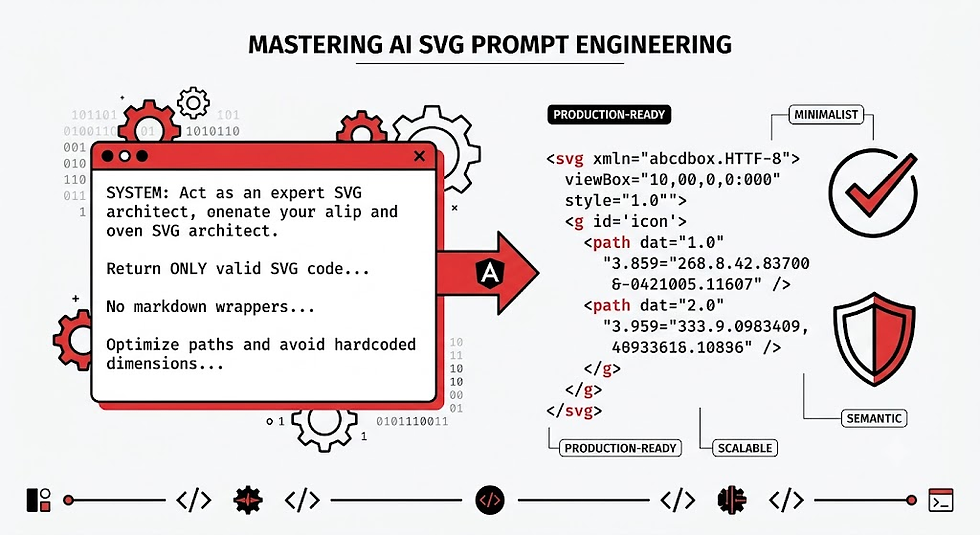
As web development evolves in 2026, the intersection of artificial intelligence and front-end engineering has unlocked a massive productivity hack: generating production-ready, minimalist web graphics directly via code, completely bypassing manual drawing software like Adobe Illustrator or Figma.
Modern Large Language Models (LLMs) and specialized code-generation engines understand the structural mathematics of Scalable Vector Graphics (SVG) perfectly. However, if you simply ask an AI to "draw a modern dashboard icon," you will likely end up with a bloated, absolute-positioned nightmare filled with redundant groups, hardcoded dimensions, and messy inline styles.
To get clean, semantic, and highly performant code, you need a deterministic framework. This guide outlines exactly how to leverage AI SVG prompt engineering to generate flawless, scalable web assets on the first try.
Why Native SVG Code Generation Matters in 2026
SVGs are not traditional images; they are XML-based documents that describe shapes, paths, colors, and coordinates. Because they are text, they are incredibly lightweight, infinitely scalable, and fully interactable via CSS and JavaScript.
For modern web platforms prioritizing Core Web Vitals and instant loading states, generating SVGs directly through AI code models offers significant advantages:
Zero Asset Bloat: AI-engineered SVGs strip away the proprietary metadata editor overhead (like Figma or Illustrator export artifacts), reducing file sizes by up to 80%.
Immediate Responsiveness: By forcing the AI to use responsive structural attributes, your graphics automatically adapt to fluid layouts.
Direct DOM Manipulation: Clean code allows developers to animate path sequences, swap fills on hover, or bind data-driven variables directly to the XML nodes.
To unlock this efficiency, you must treat the AI as a precision machine rather than a human designer. Here is the structural blueprint to make that happen.
The Core Blueprint for Clean SVG Prompts
To prevent an AI engine from hallucinating random coordinate paths or dumping messy styling tags, your prompt must establish a strict structural sandbox. Think of your prompt as a configuration file. A production-ready SVG prompt should always contain five distinct pillars:
1. Document Scope and Wrapper Constraints
Explicitly define the root tag attributes. Tell the AI to omit the XML declaration wrapper (which messes up inline HTML embedding) and enforce a clean bounding box.
Example constraint: Return ONLY valid SVG code starting with <svg> and ending with </svg>. Do not wrap in markdown unless requested. Establish a explicit viewBox="0 0 24 24" and set width="100%" and height="100%" for fluid scaling.
2. Primitive Shape Priority
A classic mistake AI engines make is converting simple shapes into hyper-complex <path> coordinates. A circle shouldn't be an eight-point cubic bezier curve; it should be a <circle> tag.
Example constraint: Utilize semantic SVG primitives (<circle>, <rect>, <line>, <polygon>) wherever mathematically possible. Only resort to <path> for custom complex organic curves.
3. Layout and Structural Organization
Force the AI to write human-readable code. Grouping logically allows you to easily manipulate the graphic later.
Example constraint: Group semantic components using <g> tags. Use id attributes or class names for distinct elements (e.g., id="background-grid", id="foreground-icon").
4. Style Architecture
Specify exactly how colors, borders, and effects should be applied. For web production, presentation attributes or CSS classes are vastly superior to bloated, repeating inline strings.
Example constraint: Do not use inline style="..." attributes. Use semantic presentation attributes like fill, stroke, stroke-width, and stroke-linecap="round". Use currentcolor where appropriate to enable CSS color inheritance.
5. Code Optimization Checklist
Explicitly demand the elimination of mathematical fluff.
Example constraint: Optimize for minimum path nodes. Keep coordinate numbers rounded to a maximum of two decimal places. No hidden duplicate layers, no empty groups (<g>), and absolutely zero design software metadata.
The Master Prompt Template
When you want to generate a new graphic, use this structural prompt template. Fill in the bracketed variables based on your specific UI needs.
Plaintext
[System Role]
You are an expert front-end engineer and senior SVG architect specializing in high-performance, minimalist web graphics.

[Objective]
Generate raw, production-ready, highly optimized SVG code for a [Describe your asset, e.g., "minimalist multi-layered analytical line chart icon"].

[Technical Specifications]
- Bounding Box: viewBox="0 0 [Width] [Height]", width="100%", height="100%"
- Aesthetic: Minimalist, clean lines, modern SaaS UI style
- Color Palette: [Specify colors or ask for currentColor/semantic values]

[Strict Code Constraints]
1. Output ONLY the raw SVG code block. No explanations, no markdown wrappers, no HTML page boilerplates.
2. Semantic Primitives: Use native shapes (<rect>, <circle>, <ellipse>) instead of drawing them via paths.
3. Node Optimization: Keep path data (<path d="..." />) tight. Round coordinates to 1 or 2 decimal places maximum. Avoid excessive bezier control points.
4. Clean Architecture: Order layers logically from background to foreground. Group related components with `<g>` and use semantic `id` hooks.
5. Styling: Use crisp presentation attributes (fill, stroke, stroke-width). Set stroke-linejoin="round" and stroke-linecap="round" for clean vector intersections.
6. Responsive & Performance: Ensure zero hardcoded style widths/heights outside the viewBox. Do not generate empty or single-element groups.
Advanced Techniques: Micro-Managing Complex Geometries
For sophisticated graphics—such as multi-step wizard maps, intricate system architecture nodes, or abstract landing page patterns—you can micro-manage the AI engine using mathematical instructions:
Grid Snap Alignment: Tell the AI to snap points to an invisible matrix. For example: "Ensure all path endpoints and line anchors lie exactly on a whole integer or 0.5 coordinate increment to prevent anti-aliasing blur on non-retina displays."
Symmetry Enforcement: For perfectly balanced shapes (shields, hearts, stars), instruct the AI to calculate the exact reflection plane: "The object must be perfectly symmetrical across the center X-axis (X=12 for a 24x24 box). Ensure matching reflection offsets for all anchors."
Responsive Control Handles: If you plan on animating the graphic later using CSS transitions or green-sock libraries (GSAP), add explicit hook requirements to your prompt: "Add unique class names like class="anim-trace-1" and class="anim-trace-2" to the sequential vector paths so they can be selected by external animation timelines."
FAQ: High-Performance AI SVG Generation
Can I use AI SVG prompt engineering to convert complex PNGs into code?
While text-based AI models excel at generating structural SVG vectors from textual parameters, they cannot directly "see" pixel data to accurately convert a PNG file to raw vector points. For image-to-vector workflows, first use a specialized vision or vectorization model to parse the visual structure, then feed the rough path data into a text model along with your optimization instructions to clean up the code.
How do I troubleshoot broken viewboxes or clipped vector paths generated by AI?
If an AI engine returns a graphic where elements are clipped or cut off at the edge, the coordinate math has run outside the bounds of your declared container matrix. To fix this, prompt the model with the broken code and state: "The graphics coordinates exceed the viewBox envelope. Recalculate all coordinates to compress the graphic by 10%, adding a padding safety buffer inside the established viewBox dimensions."
Why does the AI keep injecting markdown formatting when I ask for raw code?
LLMs are deeply trained to encapsulate code samples inside markdown code fences for human readability. To fully eliminate this behavior in programmatic API integrations, set your API temperature parameter lower (around 0.2) and add a strict system-level prompt instruction stating: "Do not output triple backticks, text summaries, or markdown formatting. Start character number one with ''."
Elevate Your Front-End Workflow
Building lightning-fast web applications demands clean, maintainable assets. By mastering structured prompt guidelines, you completely eliminate the friction of visual export tools, generating lightweight web graphics instantly.
Ready to integrate these automated assets into your modern application structure? Check out the W3C SVG Authoring Specifications to learn more about semantic vector compliance, or explore the SVGO Optimization Repository on GitHub to build automated minification pipelines for your generative vector code assets.


Comments